The Beginner's Guide to Understanding NVIDIA GPUs
For the record, this blog is a summary of what I learnt from GPU_glossary.
From Abstraction to Reality: How Your Code Runs on NVIDIA GPUs
If you’ve ever looked at NVIDIA’s GPU documentation, you might feel like you’re reading a foreign language. There are “SMs”, “Warps”, “Grids”, “Blocks”, “Tensor Cores”… and keeping them all straight is a nightmare.
This guide is designed to bridge the gap between the code you write (the software abstraction) and the metal that runs it (the hardware reality). We’re going to ignore the marketing fluff and focus on exactly how these pieces fit together.
The Mental Shift: CPU vs. GPU
Before we dive into the jargon, let’s establish the fundamental difference between the processor in your laptop (CPU) and the graphics card (GPU).
- The CPU is a Ferrari. It’s designed to take a small number of passengers (threads) from Point A to Point B as fast as humanly possible. It has giant caches and complex logic to make sure one single task finishes quickly. This is Latency optimization.
- The GPU is a Bus Service. It’s not trying to get one person across town in record time. It’s trying to move thousands of people across town at once. It might take a bit longer for the bus to start and stop, but the sheer volume of people moved per minute is massive. This is Throughput optimization.
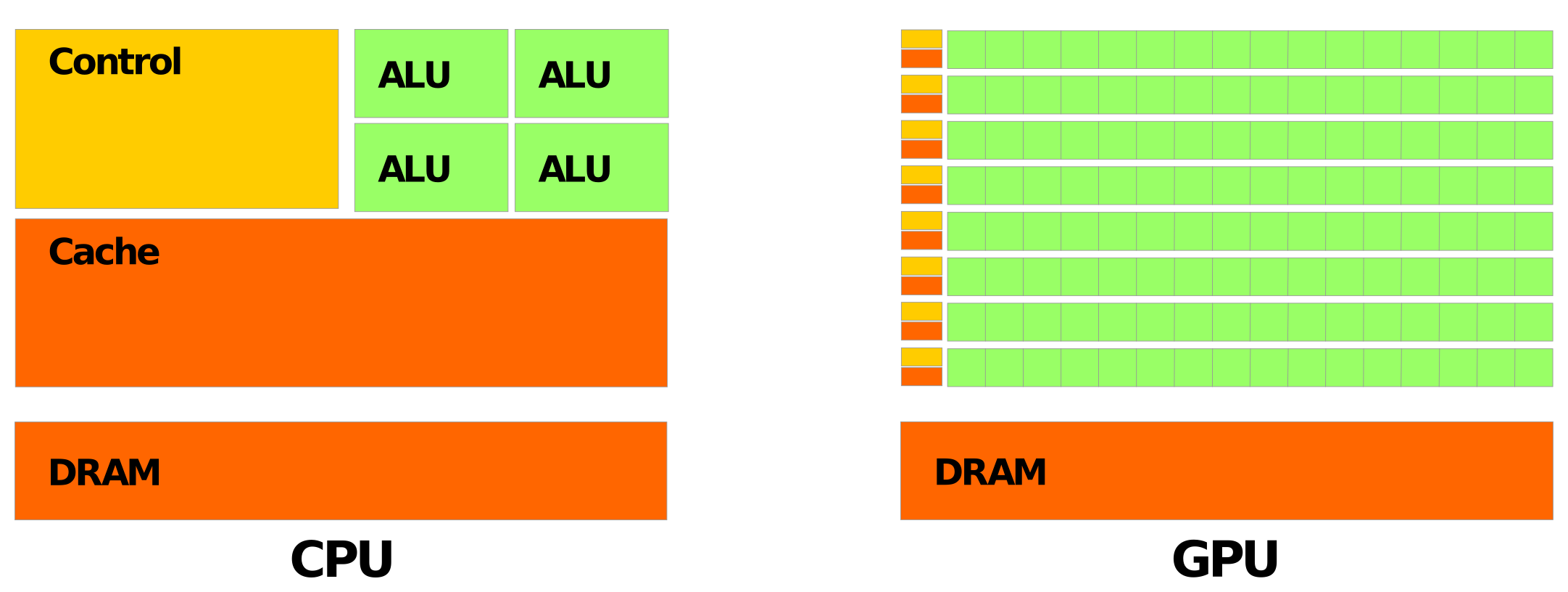
Because of this difference, GPUs have a completely different architecture. They don’t have a few powerful cores; they have thousands of tiny, simple ones.
1. The Core vs. The Thread
Let’s start at the absolute bottom.
The Hardware Reality: The Core Deep inside the silicon, the most basic unit of computation is the Core (specifically, the CUDA Core). This is the workerbee. It can do basic math (add, multiply) for one piece of data at a time. Newer GPUs also have Tensor Cores, which are specialized workers that can only do one specific job: multiply tiny matrices together really, really fast (essential for AI and scientific computing).
The Software Abstraction: The Thread When you write code for a GPU, you don’t talk to Cores directly. You write a function (called a Kernel) and tell the GPU: “Run this function 10,000 times.” Each individual execution of that function is called a Thread.
The Bridge: A Thread is a set of instructions. A Core is the physical spot where those instructions get executed.
2. The Streaming Multiprocessor (SM) vs. The Thread Block
One core isn’t very useful. So NVIDIA groups them together.
The Hardware Reality: The Streaming Multiprocessor (SM) This is the real heart of the GPU. An SM is like a department in a factory. It contains:
- A bunch of CUDA Cores (usually 64 or 128).
- Some Tensor Cores.
- Some fast memory (we’ll get to that).
- Schedulers to hand out work.
An H100 GPU, for example, has 144 of these SMs.
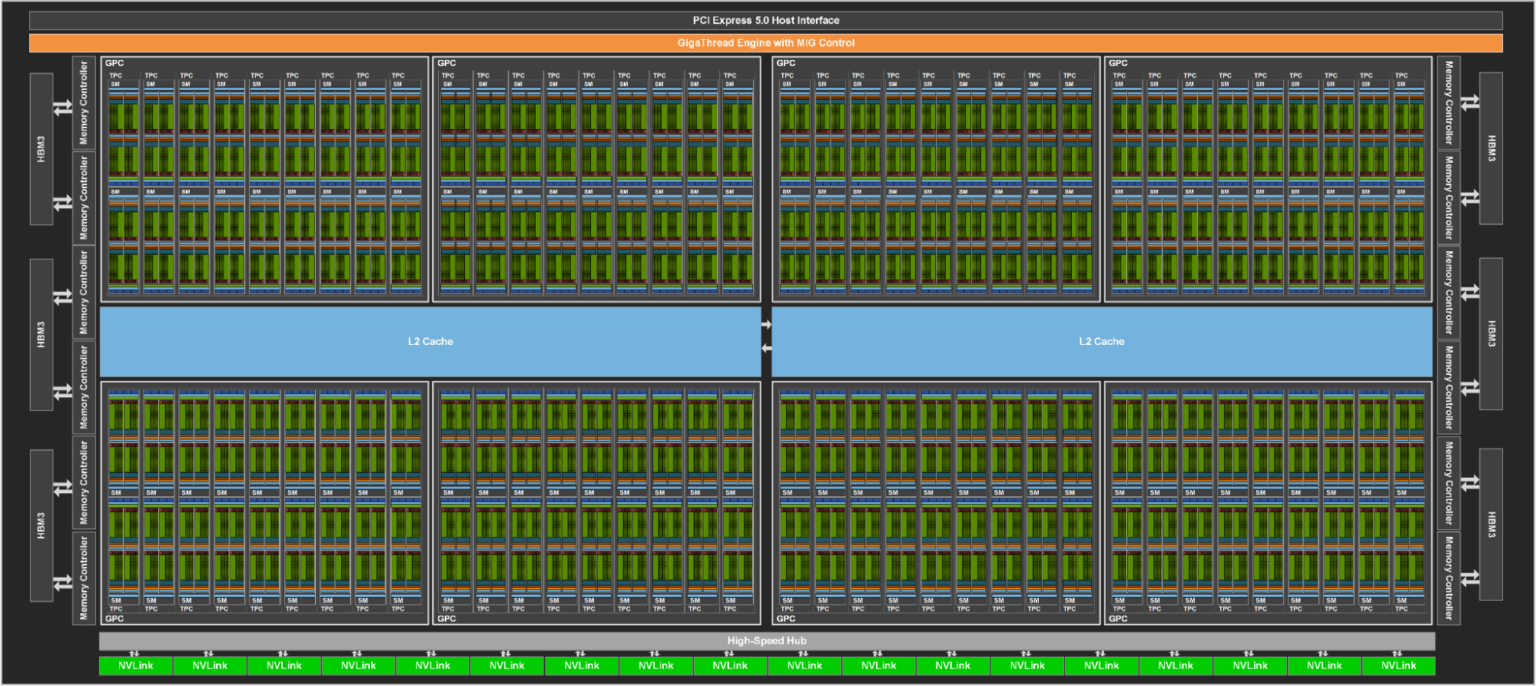
The Software Abstraction: The Thread Block Managing 10,000 individual threads would be chaos. So, in your code, you group threads into Thread Blocks. You might say, “I want 10,000 threads, grouped into blocks of 256.”
The Bridge: When you launch your program, the GPU assigns an entire Thread Block to a single SM. The SM is responsible for running all the threads in that block. Once assigned, that block stays on that SM until it’s finished.
3. The Grid vs. The GPU
The Hardware Reality: The Device The entire GPU itself (the “Device”) is just a collection of all those SMs we just talked about, connected to some big memory banks (VRAM).
The Software Abstraction: The Grid The collection of all your Thread Blocks is called the Grid.
The Bridge: The Grid covers the entire problem you are solving. The GPU’s hardware scheduler breaks up this Grid and feeds the Blocks to the available SMs. If you have a huge Grid and a small GPU, the hardware just queues up the Blocks and runs them as fast as it can. This is why CUDA code scales automatically: a better GPU just executes more Blocks at once.
| Software Concept | Hardware Home |
|---|---|
| Thread | Core |
| Thread Block | Streaming Multiprocessor (SM) |
| Grid | Entire Device (GPU) |
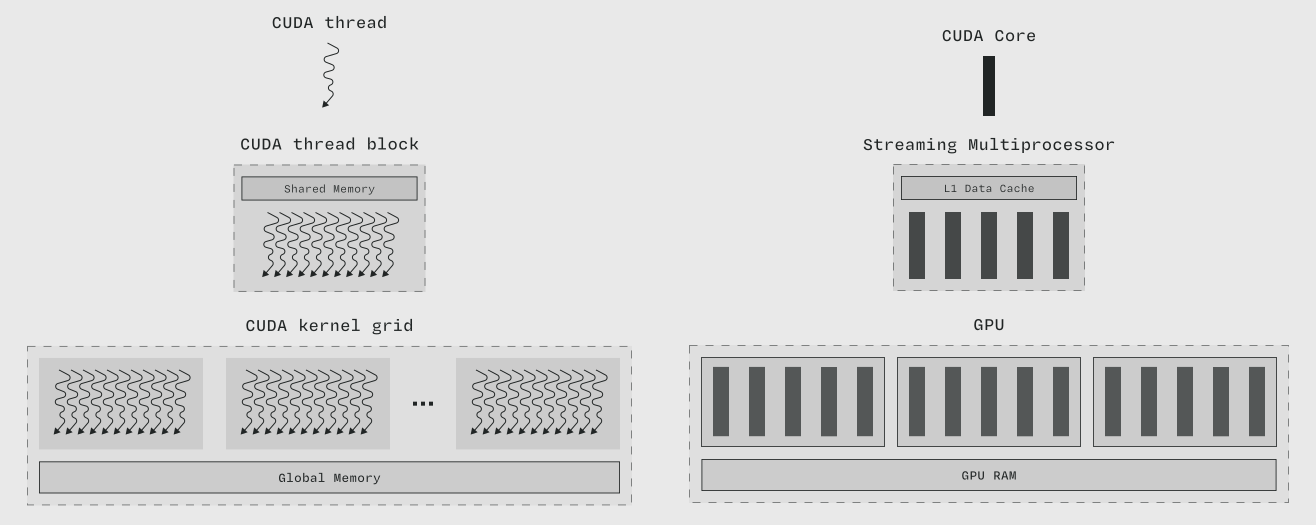
(Figure from GPU Glossary)
4. Memory: Where Data Lives
Understanding where your data lives is the single most important part of GPU performance.
- Global Memory (GPU RAM):
- Analogy: This is the warehouse down the street. It’s huge (80GB+), but it takes a long time to travel there to pick up a package (data).
- Reality: This is the VRAM on the card.
- Shared Memory (L1 Cache):
- Analogy: This is a communal workbench shared by all the workers (threads) in the same room (Block). It’s really fast, but small.
- Reality: Physically located inside the SM. You, the programmer, have to manually move data here if you want to use it efficiently.
- Registers:
- Analogy: This is the pocket of the individual worker. It’s instant to reach, but you only have so many pockets.
- Reality: Private memory for each thread to store its local variables.
5. The Secret Sauce: Warps and Latency Hiding
Here is the “gotcha” that catches every beginner.
You might think that if you have 32 threads, they all run independently. They don’t. The hardware groups threads into bundles of 32 called Warps.
The Drill Sergeant (SIMT) A Warp executes in “Lock-step”. It’s like a drill sergeant commanding a platoon: “Everyone take a step forward!” If one soldier needs to tie their shoe (an if statement that takes a different path), everyone else has to wait. This is why “branching” code is bad on GPUs.
Running the Bus Service (Latency Hiding) Remember the “Bus Service” analogy? When a Warp needs to load data from Global Memory (the warehouse), it takes a long time (hundreds of clock cycles). The SM doesn’t just sit there and wait. It says, “Okay, Warp 1 is waiting for memory. Warp 2, you’re up!”
It instantly switches to another Warp that is ready to calculate. By the time Warp 2 needs memory, Warp 3 is ready. Eventually, Warp 1’s data arrives, and it jumps back in line.
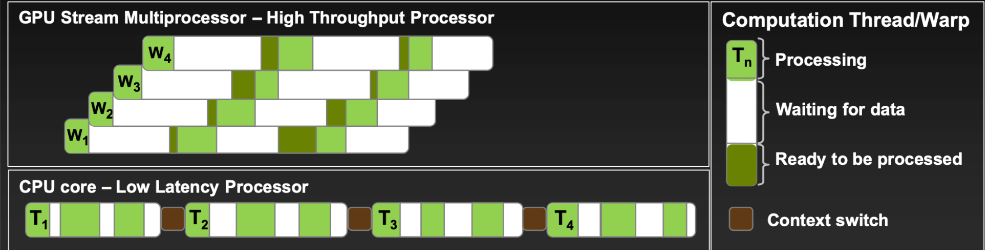
This is Latency Hiding, and it is the key to GPU performance. You need to launch way more threads than you have cores, just to keep the hardware busy while it waits for memory.
Summary
- Software: You write a Kernel. You launch a Grid of Thread Blocks, each containing hundreds of Threads.
- Hardware: The GPU assigns Blocks to SMs. The SMs group threads into Warps of 32. These Warps execute instructions on Cores.
- Performance: If you align your software structure (Blocks/Threads) to respect the hardware reality (SMs/Warps), you get incredible speed. If you fight the hardware, you get a very expensive space heater.
Enjoy Reading This Article?
Here are some more articles you might like to read next: