The Generalist and the Specialist: Understanding the NVIDIA GPU and Google TPU Architectures
Today, I just learnt the TPU is what help Google Gemini 3.0 to be so amazing. So I take a deeper look at the differences between the NVIDIA GPU and the Google TPU. While they are often discussed as direct competitors, they represent two fundamentally different approaches to solving the same problem: how to process the massive mathematical workloads required by modern neural networks.
Rather than a simple comparison of specifications, understanding the choice between these two requires looking at their underlying design philosophies—versatility versus specialization.
1. The NVIDIA GPU: The Versatile Parallel Engine
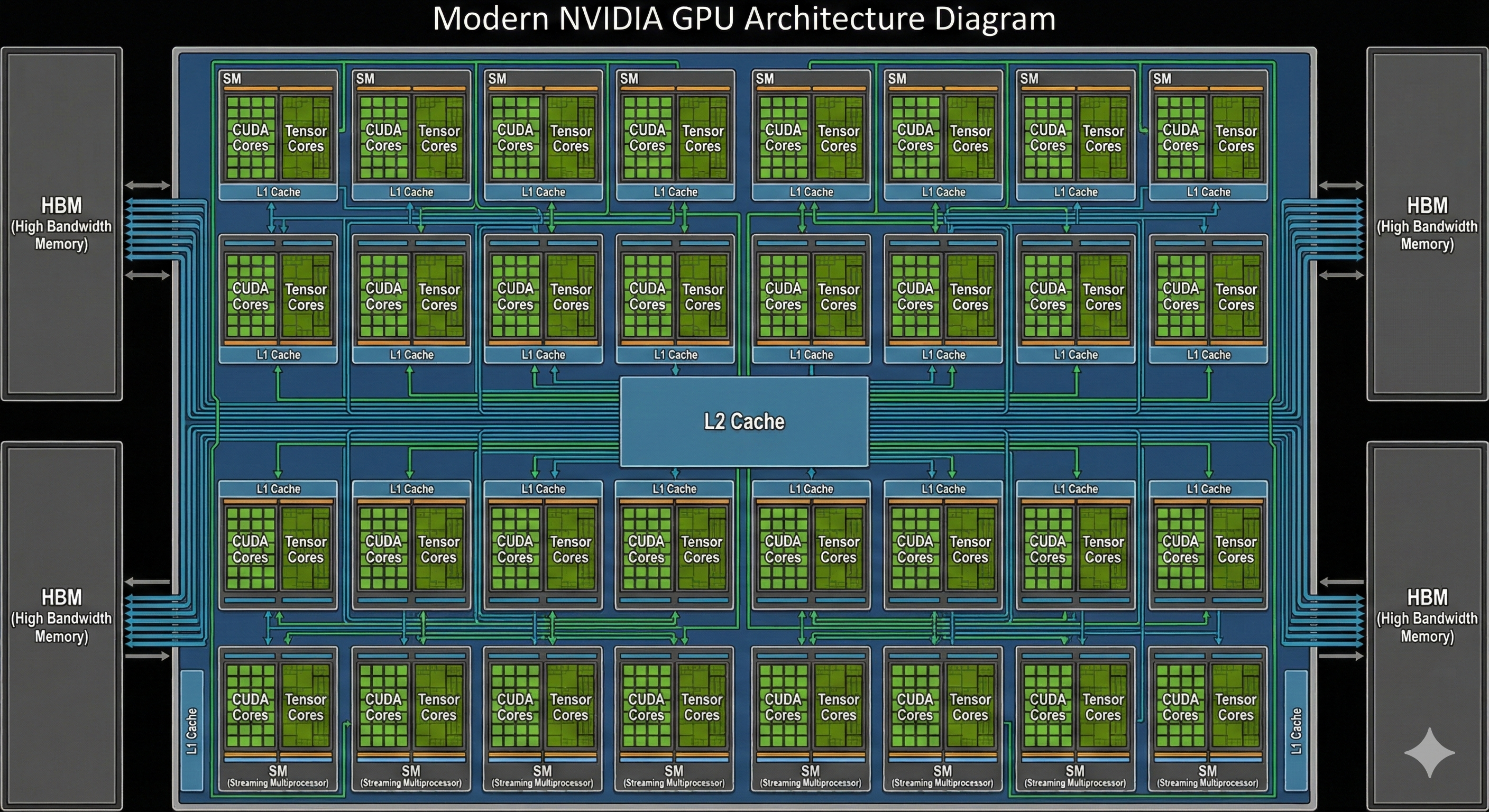
The NVIDIA GPU (Graphics Processing Unit) is a general-purpose parallel processor. Its design legacy comes from the world of computer graphics, where millions of pixels must be updated simultaneously. This requirement evolved into a chip capable of handling a vast number of independent tasks at once.
Design Logic: Flexibility First
NVIDIA’s architecture is built around Streaming Multiprocessors (SMs). Inside each SM are thousands of CUDA cores (for general mathematical operations) and, in recent generations, specialized Tensor Cores (optimized for AI math).
- Logic: The GPU is designed to be programmable for almost any task that can be parallelized. Beyond AI, it handles scientific simulations, 3D rendering, and complex data analytics.
- Workflow: Because it is a general-purpose processor, the GPU uses a traditional instruction cycle (Fetch-Decode-Execute). It pulls data from High Bandwidth Memory (HBM) into various levels of cache (L1, L2) before processing it.
- Memory & Cache: GPUs rely on a complex cache hierarchy to manage data that might be accessed unpredictably. This makes them exceptionally good at handling models with complex, dynamic architectures or sparse data.
2. The Google TPU: The Matrix Multiplication Specialist
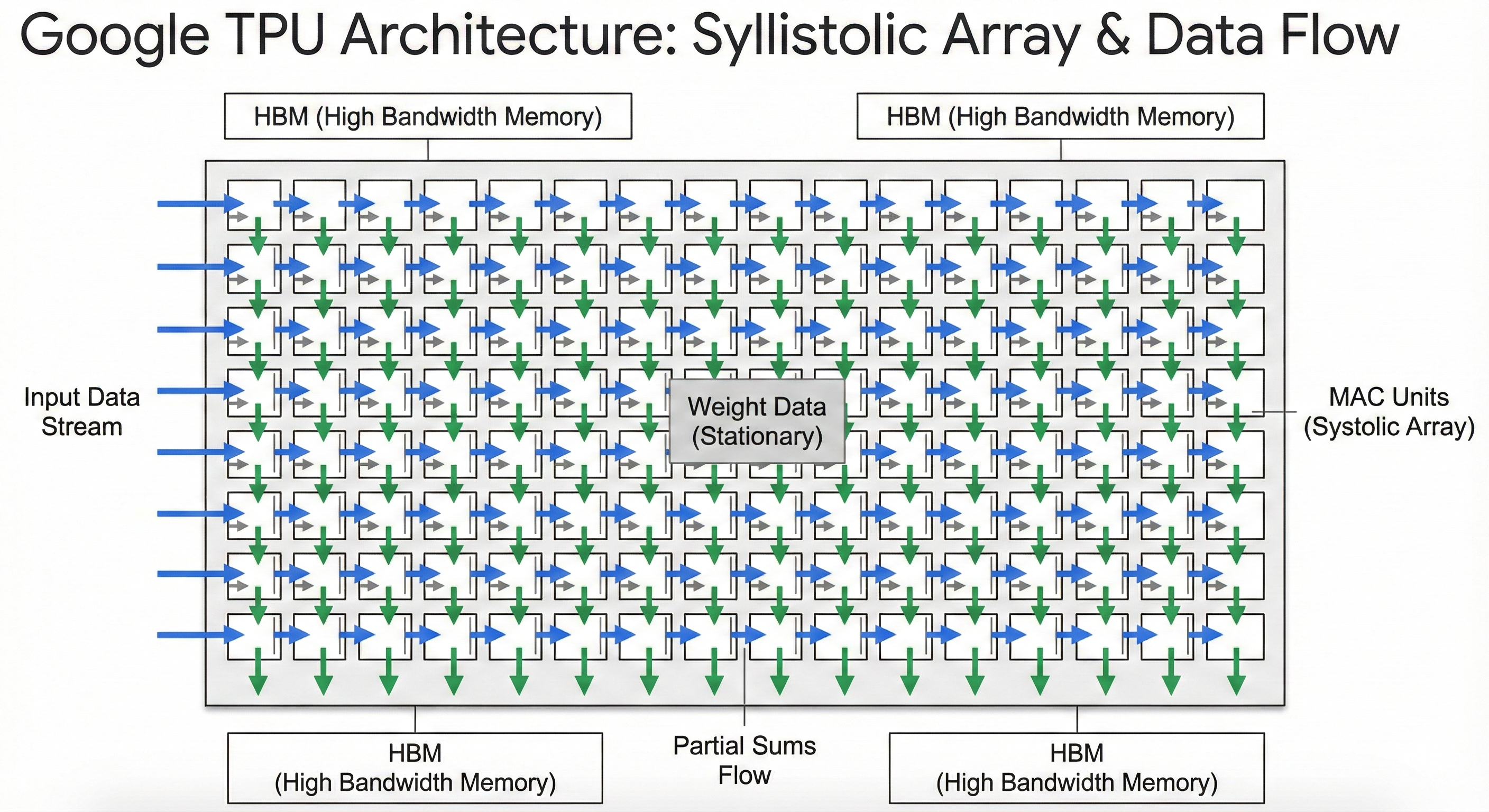
The Google TPU (Tensor Processing Unit) is an Application-Specific Integrated Circuit (ASIC). Unlike the GPU, it was not designed to do everything well. It was designed from the ground up for one specific mathematical operation: matrix multiplication, which makes up the vast majority of deep learning computations.
Design Logic: The Systolic Array
The heart of the TPU is the Systolic Array. If a GPU is like a massive team of workers each handling their own small task, a TPU is like a high-speed factory assembly line.
- Logic: In a systolic array, data flows rhythmically through a grid of processing elements (PEs). Once a piece of data enters the grid, it is passed directly from one cell to the next neighbor.
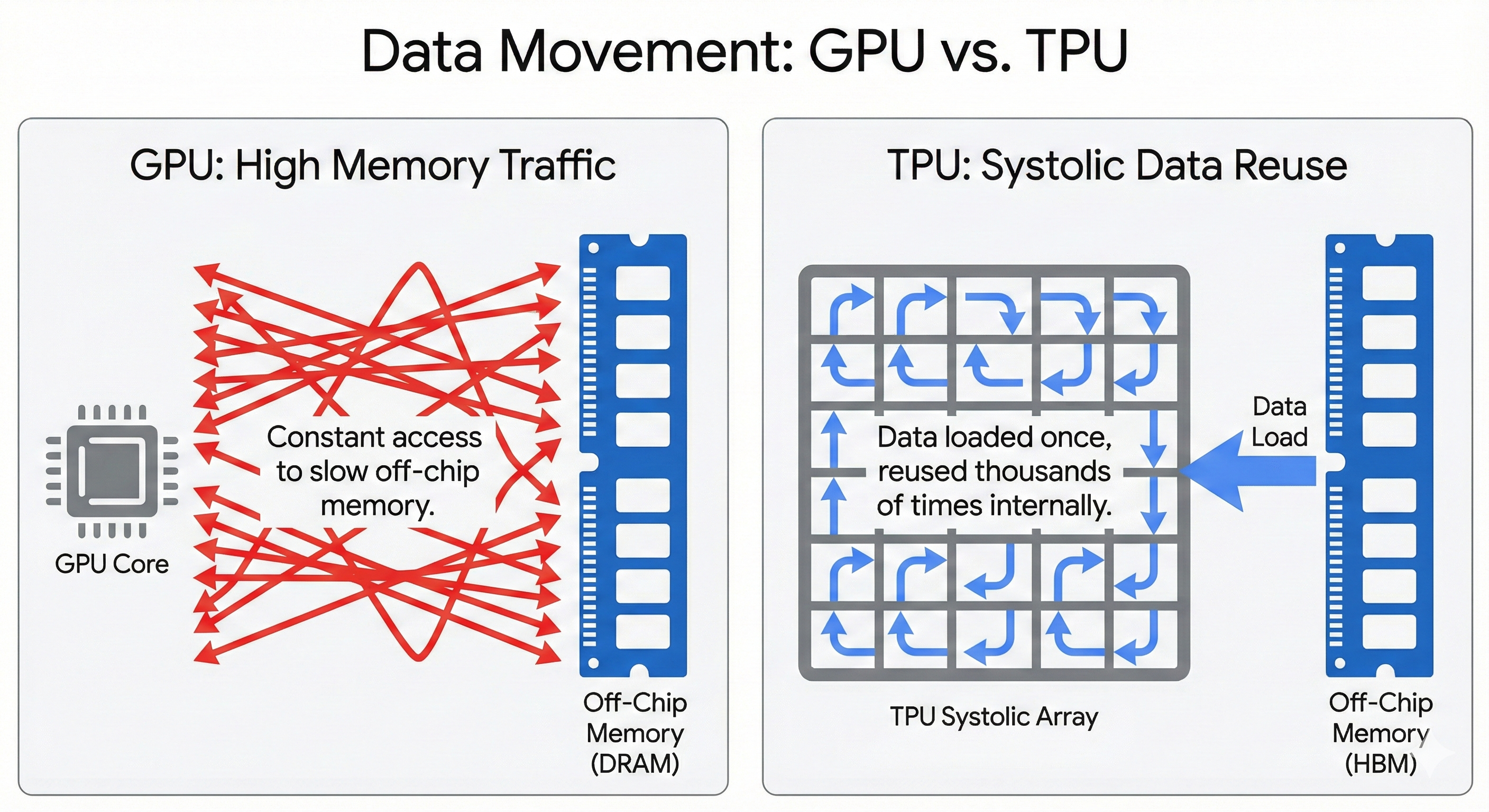
- The “Heartbeat”: This “pulse” of data—passing from neighbor to neighbor—means the chip does not have to constantly reach back to the main memory. This significantly reduces the energy cost and latency associated with moving data.
- Workflow: By specializing in this specific flow, the TPU eliminates much of the overhead required for general-purpose programming (like complex branch prediction), dedicating almost all its physical silicon area to raw computation.
3. Deep Dive: The Core Difference
The distinction between these architectures becomes clearest when you look at how they handle data movement and software.
The “Systolic” Advantage
In a GPU, data is typically fetched from memory, processed, and written back. In a TPU’s systolic array, data flows in a wave.
- Weights are loaded into the array and held stationary.
- Data streams across them.
- Results accumulate as they pass through.
This provides immense arithmetic intensity—performing many calculations for every byte of data fetched from memory. This is why TPUs often achieve higher “performance-per-watt” on dense, large-scale training tasks.
Software Ecosystems: CUDA vs. XLA
If the hardware is the body, the software stack is the brain.
- NVIDIA & CUDA: NVIDIA uses CUDA, a mature, low-level platform that gives developers fine-grained control. It supports Dynamic Computation, meaning the GPU can decide what to do on the fly. This makes debugging easy and allows for “messy,” experimental code. It is the default language of AI research.
- Google & XLA: TPUs rely on XLA (Accelerated Linear Algebra). This compiler acts like a master architect. It analyzes the entire AI model at once and “fuses” operations together into a single, static graph. This requires the developer to be more disciplined (e.g., defining fixed data shapes), but the result is a highly optimized execution plan that squeezes maximum performance from the hardware.
4. The Hybrid Workflow: Coupling Them Together
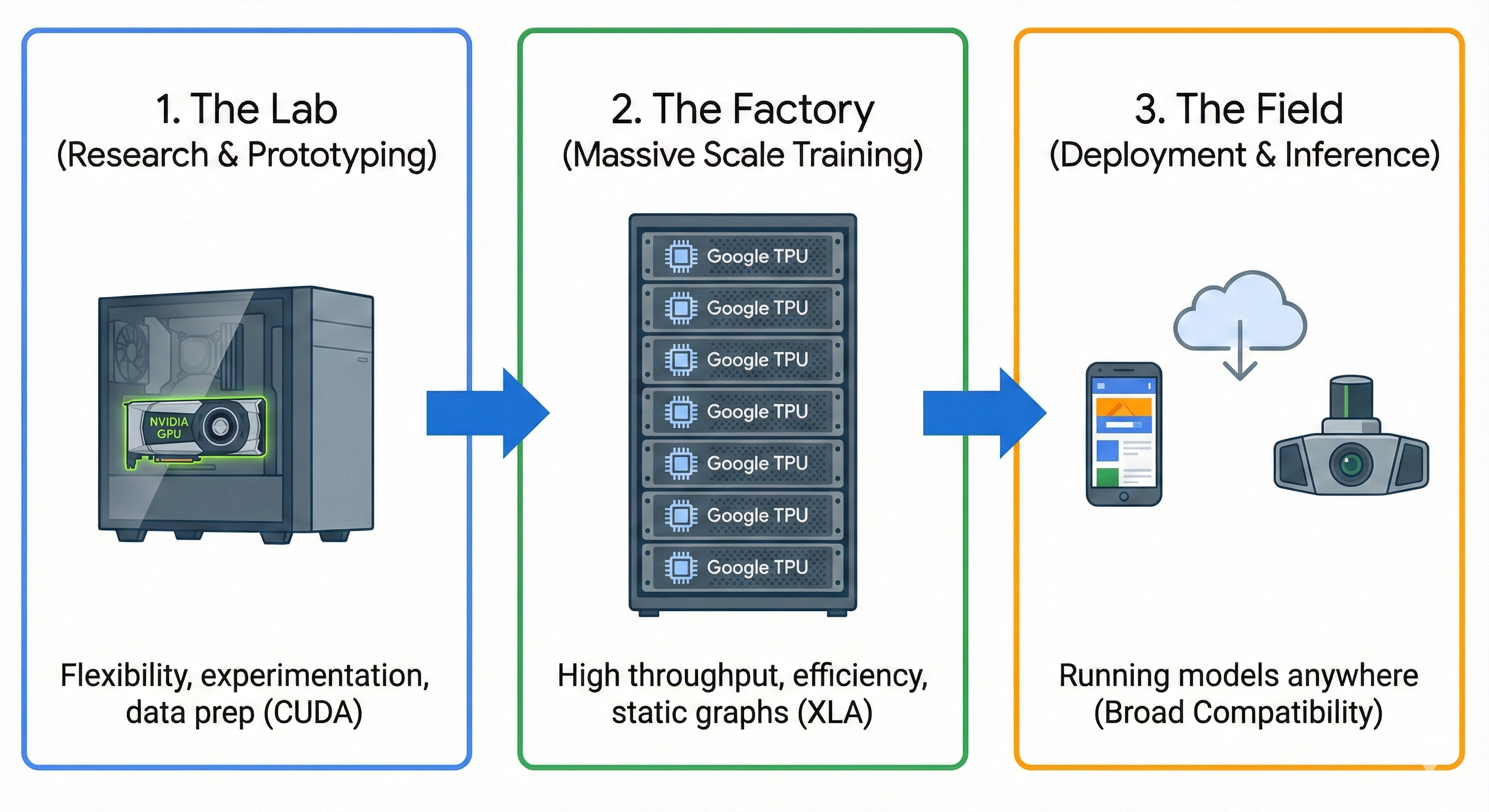
In practice, modern AI development often couples these architectures to leverage the strengths of both. A typical high-performance workflow might look like this:
- The “Lab” (GPU): Engineers use NVIDIA GPUs for data preprocessing, experimental coding, and initial prototyping. The flexibility of the GPU allows for complex data augmentation pipelines (processing images or text) that might not fit neatly into a matrix multiplication grid.
- The “Factory” (TPU): Once the model architecture is finalized and the goal shifts to training on massive datasets, the workload is moved to a TPU Pod. The code is compiled via XLA, and the heavy lifting is performed where the cost-per-flop is lowest.
- The “Field” (GPU/CPU): After training, the model is often converted back to a format compatible with NVIDIA GPUs or even CPUs for deployment, ensuring it can run anywhere—from a cloud server to a user’s laptop.
Conclusion
The NVIDIA GPU is the versatile workhorse, offering the freedom to innovate and the compatibility to run anywhere. The Google TPU is the specialized sprinter, offering the pure, streamlined power required to train the world’s largest AI models. For the modern AI engineer, understanding when to use the flexibility of the GPU and when to deploy the efficiency of the TPU is key to building scalable, effective systems.
Enjoy Reading This Article?
Here are some more articles you might like to read next: